Last Modified: December 6th, 2011
Sunday, 6. March 2011

Windows XP on Medion Akoya E1222
The Netbook Medion Akoya E1222 (MD98240) is delivered with Microsoft Windows 7 Starter Edition. Less Memory (1 MB RAM) and the restricted features of Windows 7 are just two reasons to downgrade to Windows XP. Especially if you have a XP license left. Medion does not support Windoes XP on this machine at all but the service supported me finding appropriate drivers.
This How To describes the installation of Windows XP on the Medion Akoya E1222 Netbook for unexperienced users. Furthermore I point to external sources for some missing drivers.
[...]
Category: English Posts, German Posts, Hardware, How To's, Windows |
Comments (14)
Wednesday, 29. December 2010
After upgrading CMS Made Simple 1.8.2 to 1.9.2 I noticed:
- pageloading lasted longer as in Version 1.8 on the same server,
- problems with Umlauts and special characters and
- CSS-problems in the menu.
[...]
Category: CMS Made Simple, English Posts, German Posts, How To's |
Comments (1)
Sunday, 15. August 2010
In the first part of this field report I reviewed the Organizer of Photoshop Elements 8. In this part I review the Editor of PSE 8. It is based on Photoshop CS4.
Adobe cropped some functions and tools of CS 4 in PSE’s Editor but added some new ones which were designed for beginners.
Whether these crops constrains my work flow or not shows the following report.
[...]
Category: English Posts, Field Reports, German Posts, Photo |
Comments (3)
Sunday, 15. August 2010
Hobby photographers will look for a photo organizer and editor sooner or later. Especially if you are working with RAW photos you expect a optimized work flow from such a “all-included” software with media organizer, raw converter, photo editor and additional built-in tools.
Photoshop Elements 8 (PSE) contains all these compounds and the manufacturer Adobe® is known for high quality and professional graphic software as Photoshop CS and Lightroom.
PSE 8 is divided into two parts: the Organizer, which manage all your media data and the Photo Editor, the image processor. The first part of this field report is focused on the Organizer.
[...]
Category: English Posts, Field Reports, German Posts, Photo |
Comments (3)
Last Modified: July 30th, 2010
Sunday, 21. March 2010
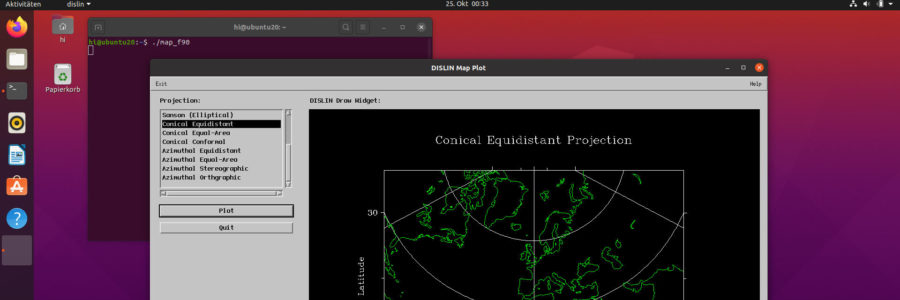
DISLIN is a very nice and well-documented 2-D and 3-D plotting framework for Fortran and some other programming languages. Furthermore DISLIN provides some widgets to create simple graphic user interfaces (GUIs).
The installation of DISLIN is very easy on RPM-based Linux-distributions, like openSuSE etc. But it is not that easy on DEB-based ones especially on Ubuntu. This How-To describes how to install DISLIN 10.0 on Ubuntu 9.04 (Jaunty Jackalope) step-by-step and should work on 9.10 and 10.04 too. [...]
Category: English Posts, Fortran, How To's, Linux, Ubuntu |
Comments (3)
Last Modified: August 21th, 2011
Tuesday, 29. December 2009
FreeNAS supports the appropriate hardware of the FreeBSD-Version where FreeNAS is based on. A overview can be found on Compatible Hardware Lists. But sometimes it is necessary to install a third-party or a self-compiled driver.
This how-to describes how to install a downloaded binary Ethernet interface (NIC) driver on FreeNAS. It was written for non-experienced Unix users.
[...]
Category: English Posts, German Posts, How To's, Network |
Comments (30)
Sunday, 27. December 2009
Sorry, this entry is only available in Deutsch.
Category: German Posts, How To's, Network |
Comments (3)
Sunday, 27. December 2009
The integrated filemanager of FreeNAS is not sufficient for some tasks. For Windows users WinSCP provides all missing functions to manage your files on a FreeNAS server, e.g. change ownership of files or to feed your server with data. Only the ssh service has to run.

Activate UTF-8 on WinSCP - German version
It is easy to setup session data but by default German umlauts or other non-ASCII characters in file and folder names were not displayed correctly. To avoid this the UTF-8 support of WinSCP has to be activated explicitly. The default setting “auto” is not sufficient. You may find the setting in “Enviroment” in the entry “UTF-coding for filenames” or similar. Turn on this setting solves the problem.
On Filezilla umlauts are displayed correctly by default.
Category: English Posts, German Posts, How To's, Network |
Comments (0)
Sunday, 13. September 2009
Sometimes it is useful for a Fortran 90 program to know on which platform it runs. The main reasons why I wrote the module PLATFORM are to know where the home directory is and where to store the configure files (e.g. namelist-files) on the currently used platform without maintaining different platform-dependent source files.
The module PLATFORM detects:
- DOS-based Windows platforms, as 95/98(SE)/ME
- NT-based Windows platforms, as NT/2000/XP/Vista/7
- Unix(-like) platforms, as Linux, MacOS X, etc.
[...]
Category: English Posts, Fortran |
Comments (0)
Sunday, 13. September 2009
Sometimes it could be necessary to rescue data from a FreeNAS hardisk or other UFS-formatted drives. UFS will not be recognized and mounted on Linux or Windows automatically. To read data from these disks on Linux some steps are needed to be done. For Microsoft Windows® third party drivers are available for this purpose.
[...]
Category: English Posts, German Posts, How To's, Linux, Network |
Comments (0)